
Artificial Snow Machine Rental in Phoenix: Choosing Your Setup
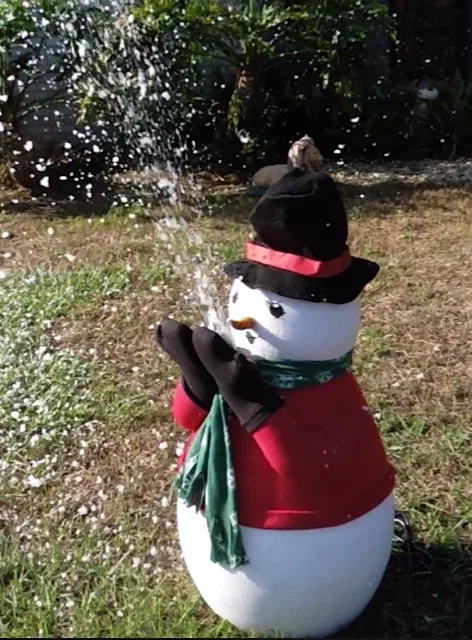
An artificial snow machine rental gives your Phoenix party the appearance of falling snow using snow fluid, not frozen water. Choose the equipment based on your snowfall area, sound requirements, and operating schedule, not just your total guest count.
TL;DR
- Arizona Bounce Around offers artificial snow machine rental options for Phoenix birthdays, school celebrations, and larger events.
- Artificial snowfall creates atmosphere; it is not a substitute for real snow used for building snowmen.
- Choose the S-200, S-500, or High Power Artificial Snow Storm Machine based on placement and event needs.
- Confirm fluid, electricity, venue permission, and surface monitoring before booking.
Why the type of snow matters
A winter-themed birthday and a community tree lighting can both use falling snow, but they need different layouts. A family photo corner needs a defined backdrop. A public celebration needs room for spectators, equipment access, and an unobstructed route past the attraction.
Start by reviewing the S-200 snow machine rental if you want an adjustable snowfall effect for a designated party area. Then compare other models when sound, remote placement,t or a larger visual effect matters more.
Arizona Bounce Around artificial snow machine rentals suit Phoenix hosts who want a falling-snow atmosphere rather than a real-snow play surface. That distinction should guide your invitations, venue discussion, and equipment choice.
What does an artificial snow machine actually produce?
The machines described here produce small foam flakes using snow fluid. The effect resembles snow drifting through the air, but it does not create frozen snow for packing, sledding,g or building snowmen.
Explain this clearly when planning children's parties. Describe a snowfall photo moment or a winter-themed celebration rather than promising a yard full of real snow.
Artificial snow also needs a surface-management plan. The equipment listings warn that snow fluid can make floors slippery. Do not treat a disappearing visual effect as proof that a walkway needs no attention.
Compare artificial snow machine rental options.
These equipment details come fromArizonaAround'ss product listings, reviewed in November 2026. Specifications describe the listed equipment; they do not guarantee coverage at your venue.
| Equipment | Best for | Useful feature | Main limitation to discuss |
|---|---|---|---|
| S-200 Snow Machine | A defined party or photo area | Adjustable snowfall output and a 25-foot wired remote | Placement must account for the remote cable, power, and guest routes |
| Silent Snow Machine 500 | Layouts needing separation between the machine and snowfall outlet | A 33-foot hose with a separately positioned nozzle | Fluid demand, approved mounting,g and actual operating sound need confirmation |
| High Power Artificial Snow Storm Machine | Larger outdoor visual effects | Listed snow projection of 30 to 75 feet into the air | The listing describes loud operation, and wind affects where flakes travel |
The strongest output is not automatically the best choice. Choose equipment that fits your venue and program before deciding how dramatic the snowfall should look.
S-200: a starting point for a focused snowfall area
The S-200 offers adjustable snow output, a 25-foot wired remote, te and two fan settings. These controls let you discuss a lighter effect or a heavier snowfall moment with the rental team.
Its useful feature is adjustability. Its limitation is that the machine, cable, and power arrangement still have to fit your actual layout. A compact machine doesn't eliminate the need for an approved placement area.
Best for: a backyard celebration, themed display,y or photo area where you want a defined effect. Ask the rental team to confirm whether the proposed location suits the machine before choosing it.
S-500: useful when placement flexibility matters
The S-500 has a 33-foot hose so that you can position the snowfall nozzle separately from the main unit. The listing describes a 20-liter tank and a wireless controller, with the control unit and fluid remaining at floor level in an approved setup.
That arrangement is worth discussing when equipment would interrupt a backdrop or when a stage needs a separately placed snowfall outlet. It is not an invitation to mount the nozzle yourself.
Best for: photo or performance layouts where nozzle placement matters. Although the product is named Silent Snow Machine 500, confirm its actual operating sound rather than assuming that it is inaudible.
High-power model: plan around the whole event area
The high-power model is listed as projecting artificial snow 30 to 75 feet into the air. That is a projection description, not a promise of a fixed coverage footprint on the ground.
Its advantage is a larger visual effect. Its trade-offs include loud operation, wind-sensitive placement, and the need to keep falling flakes away from unsuitable surfaces or equipment.
Best for: an outdoor festival feature, seasonal entrance display, or larger celebration after the site has been reviewed. Ask whether the surrounding space supports the effect, not simply whether the machine fits.
How to plan your artificial snowfall
1. Define the moment you want guests to experience
Decide whether snowfall is a brief reveal, an occasional photo feature,e or a longer-running background effect. These require different operating plans, even with the same machine.
For a birthday, you might schedule snowfall around group photos. For a school or company event, connect the effect to a clearly communicated program cue. Neither approach requires promising continuous snow throughout the gathering.
Before requesting equipment, write down:
- The purpose of the snowfall.
- Where guests will stand or watch.
- When the effect should start and stop.
- Who will give the operating cue.
2. Share the venue layout before choosing a machine
A description such as "large backyard" leaves too much unanswered. Send photos showing the proposed snowfall zone, nearby doors, walking routes, and power location.
For indoor or covered areas, you need the venue's permission before finalizing the rental. Include flooring, surrounding equipment, and the approved operating location in that discussion.
Give Arizona Bounce Around these details:
- Indoor, outdoor, or covered location.
- Surface material in the snowfall area.
- Nearby outlets and access routes.
- Nearby food service, electronics,s or decorations.
- Venue restrictions affecting the setup.
3. Confirm electricity for the exact equipment
Do not assume that an outlet beside the party area can support every attraction. Share the selected machine and any other nearby equipment with the rental team and venue contact.
The S-500 listing gives power consumption as 1,200 watts. That figure is useful for planning, but it is not a substitute for confirmation of the complete electrical arrangement.
Before approving your layout, establish:
- Which power source the machine will use.
- Whether other equipment shares that supply.
- How cables will avoid guest routes.
- Whether a generator arrangement needs review.
4. Match snow fluid to operating time
Rental duration and snowfall duration are not the same thing. Tell the supplier whether you want timed bursts or extended operation, and ask for the appropriate fluid quantity for that plan.
The S-200 listing estimates approximately 8.5 liters per hour at maximum capacity and notes that output varies. Do not apply that estimate to another model or assume that a lighter setting has an exact, predictable consumption rate.
Confirm the following in your quote:
- The approved fluid for the machine.
- The quantity supplied or ordered separately.
- The planned output setting and running periods.
- Who checks and refills the fluid.
- What to do if fluid runs low.
5. Plan supervision and surface checks
A machine that produces foam flakes still requires active attention. Keep children from touching or moving the equipment, and follow the operating instructions supplied with the rental.
Ask for fluid-handling information if your venue needs it. Do not describe artificial snow as edible or promise that it cannot irritate anyone.
Agree on these responsibilities:
- Who operates and stops the machine.
- Who watches the snowfall surface.
- Who keeps equipment access clear.
- How the area will be checked before reopening after use.
6. Confirm the complete rental arrangement
Make sure the quote describes the event you are actually organizing. Don't compare a machine-only arrangement with a delivered setup as though their included services are identical.
For Phoenix, Scottsdale, Chandler, and Mesa events, provide the full address rather than only the city. For a larger event elsewhere in Arizona, request confirmation of delivery and service arrangements for that location.
Ask for written clarity on:
- Equipment selection and rental window.
- Fluid arrangements.
- Pickup or delivery responsibilities.
- Setup and operating instructions.
- Collection, cleanup,p and venue requirements.
Backyard birthdays and family parties
For a family gathering, begin with a manageable snowfall area rather than trying to cover the entire yard. Keep seating and refreshments outside the intended drift zone and give guests a clear way to watch without crowding the equipment.
A photo backdrop can give the event a purpose. Check the framing before guests arrive so the machine and cords don't dominate the picture, while keeping all placement decisions within the approved setup.
If you are planning a 2026 winter birthday, explain the activity to parents in plain language: artificial falling snow, not a real-snow building area. That helps families arrive with the right expectations.
School, corporate and community events
Larger events need an operating plan that staff can follow. Put the snowfall cue, responsible contact, and stop procedure in the event schedule rather than relying on a verbal agreement made during unloading.
For school celebrations, brief volunteers to keep access clear and report slick surfaces. For corporate programs, discuss operating sound before placing a machine near speeches, music, or recorded presentations.
For a 2026 community holiday event, share the layout with the venue before assigning vendor spaces. Avoid discovering at setup that the intended snowfall area overlaps a food line, an exit, or an attraction's entrance.
The goal is not to add snow everywhere. It is to create an effect that belongs in the program and has someone responsible for running it.
Common booking mistakes to avoid
Choosing by guest count alone. Attendance matters, but it does not describe your snowfall area. A large event can still use a small, focused photo feature.
Treating the machine as a real-snow attraction. Falling foam flakes do not create the material needed for snowballs or snowmen. Describe the experience accurately.
Assuming the fluid lasts for the whole rental. Your operating schedule and output setting determine what to discuss with the supplier. Confirm fluid separately from equipment time.
Ignore sound and surfaces. A dramatic snowfall can be a poor fit beside a microphone or over an unsuitable walkway. Review both before booking.
Improvising mounting. Do not put equipment on furniture or suspend a nozzle using an unapproved arrangement. Follow the team's equipment-specific instructions.
Request a quote for an artificial snow machine rental.
To plan an Arizona Bounce Around artificial snow machine rental, send the event date, address, guest age range, venue photos, and desired snowfall schedule. Explain whether the effect is for family photos, a birthday reveal, a school program,m or a larger public celebration.
For your 2026 event, ask for a quote that identifies the machine, fluid arrangements, power requirements, and delivery or pickup responsibilities. Contact the Phoenix rental team with those details before making your final equipment choice.
FAQ
Does an artificial snow machine make real snow?
An artificial snow machine creates foam flakes that resemble falling snow, not frozen snow. Choose it for atmosphere and photos, not snowballs, snowmen, or a real-snow play surface.
Can I rent an artificial snow machine for a Phoenix backyard birthday?
A backyard birthday is one of the uses described in the rental listings. Share the surface, power location, and proposed snowfall area so the rental team can confirm a suitable setup.
Which snow machine should I choose for a stage or photo backdrop?
Discuss the S-500 when you need the snowfall nozzle separated from the main unit. Its listed 33-foot hose provides placement flexibility, but mounting, operating sound,d and venue approval still need confirmation.
Can an artificial snow machine be used indoors?
Indoor use requires approval for the exact equipment, fluid, id and venue. Review flooring, surrounding equipment, power, and surface monitoring before committing to an indoor setup.
Is snow fluid included in the rental?
Confirm fluid separately in your quote. The S-200 and S-500 listings state that artificial snow fluid is sold separately, so don't assume the machine rental includes the quantity you need.
Will artificial snow make the floor slippery?
Artificial snow fluid can make floors slippery, as the equipment listings warn. Follow operating guidance, monitor the surface, and stop the effect if the area becomes unsuitable for guests.
How much does an artificial snow machine rental cost?
Request a quote for the equipment and complete event arrangement. Specify operating time, fluid needs, venue location, and delivery or pickup requirements, so the quote matches your plans.
One last thing: plan the camera view before the snowfall
Before the event opens, review the approved snowfall area from the spot where guests will take photos. Check that equipment access stays clear, and the backdrop works without putting people in an unsuitable spot.
For a 2026 winter celebration, that simple layout check is more useful than choosing the strongest machine first. Start with the moment you want to create, then match the equipment to it.
Related guides
- Electric trackless train rental for events: review route and loading considerations if you are adding a separate attraction to a larger winter celebration.