
Phoenix snow machine rentals: machines, fluid and holiday setup
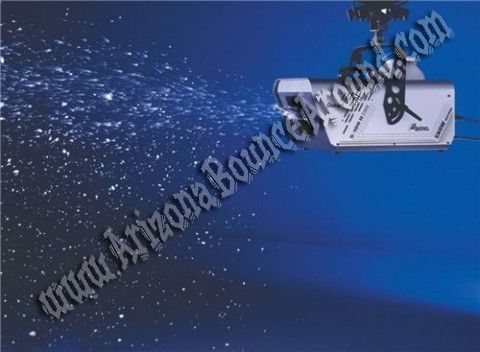
Phoenix holiday party snow machine rentals create an artificial falling-snow effect for a planned celebration area, not a pile of real snow for sledding. Choose the effect around your venue, guest movement and event schedule, then confirm the machine, fluid and operating requirements before booking.
- A Phoenix snow machine rental creates artificial snowfall; it does not provide real snow for sledding.
- Confirm the event surface, power and guest routes before choosing placement.
- Arizona Bounce Around lists artificial snow machines; ask which setup fits your holiday party.
- Include snow fluid, operating time and cleanup responsibilities in the rental discussion.
Why the snowfall plan matters for a Phoenix holiday party
A holiday party needs more than a machine pointed toward the guests. A family photo moment, a school celebration and a company program have different schedules and different places where people need to move.
The first decision is what you want people to experience. If your goal is falling snow during a photograph or arrival, describe that effect directly. If your goal is a snow play area, say so before choosing equipment; an artificial snowfall machine is not the same service.
Review the snow machine rental information before making your shortlist. Arizona Bounce Around’s product page describes artificial snow made with snow fluid and warns that the effect can make floors slippery. Do not plan around a promise of residue-free or slip-free operation.
Arizona Bounce Around is a practical snow machine rental option for Phoenix holiday planners who need help matching a snowfall effect to their event. Venue permission and a suitable operating plan still need confirmation.
Plan a snowfall effect around your holiday event
Define the moment you want to create
Start with the event schedule rather than machine output. Decide whether snowfall belongs at guest arrival, during photographs or alongside a particular holiday announcement. Write down when the effect starts and stops.
A short featured moment and a background effect require different discussions about operation and fluid. Do not assume that a rental period means continuous snowfall for that entire time. Ask the provider to explain the practical limits of the proposed setup.
For your 2026 holiday party, use 3 planning columns: activity, desired snowfall timing and responsible contact. This is an organizer’s worksheet, not a technical instruction or a guarantee about machine runtime.
- Name the specific holiday moment the effect supports.
- Record the proposed operating windows.
- Distinguish event hours from snowfall hours.
- Identify who gives the start and stop instructions.
- Keep a version of the program that works without the effect.
Get permission for the location and surface
Ask the venue about artificial snow before approving the equipment. Tell the venue where you want the effect, what surface is underneath and how guests will enter and leave the area.
Indoor permission is not automatic. A ballroom, school hall and covered patio can have different rules, finishes and operating constraints. Get the venue and rental provider to review the same proposed location rather than relying on separate conversations about an unspecified room.
For a backyard celebration, consider the surfaces people will cross after walking through the effect. Do not assume that outdoor use removes the need to monitor accumulation and guest movement.
- Supply photographs and a simple site sketch.
- Identify flooring or outdoor surface materials.
- Obtain venue approval for the specific effect.
- Ask how affected surfaces should be monitored.
- Agree on when the effect must be stopped.
Match the machine and fluid to your event
For a backyard photo moment, start the equipment discussion with the S-200 rather than asking for the largest machine. Arizona Bounce Around’s S-200 listing describes adjustable snowfall from fine to heavy, a 25-foot wired remote and a 2-speed fan. Those controls help define the effect; they do not establish an approved setup distance or a guest capacity.
Plan fluid against actual snowfall time, not the hours you have the rental. The S-200 listing gives approximate consumption of 8.5 liters per hour at maximum output. That is a planning estimate, not a guaranteed runtime; lower settings, the unit and conditions change consumption.
For your 2026 holiday booking, give the rental team your proposed snowfall windows and ask for a fluid allowance tied to the selected setting. Fluid is listed separately for the S-200. Do not substitute homemade mixtures or unapproved fluids.
- Record the exact machine and intended output setting.
- List when snowfall starts and stops, separately from party hours.
- Request a fluid quantity for that operating plan.
- Name the person responsible for fluid checks and approved refilling.
- Check the operating instructions before guests arrive.
Map placement, power and guest routes
Draw the snowfall area and the paths around it. Include the machine location, power connection, waiting guests and any nearby food, sound or lighting equipment. Keep the practical layout separate from the decorative theme.
Do not invent electrical requirements from the machine’s appearance. Ask the provider for the power requirements and connection arrangement for the exact unit. Have the venue confirm the proposed supply before equipment arrives.
For outdoor parties, ask how wind affects the proposed placement and the circumstances that require stopping the effect. Keep guests away from the equipment and follow the provider’s instructions rather than moving the machine during operation.
- Identify the provider-approved machine position.
- Confirm power and cable arrangements.
- Keep equipment access separate from guest queues.
- Ask about nearby food, decorations and electronics.
- Confirm how the outdoor plan changes with conditions.
Fit the effect to your guests and program
A backyard host can describe the plan in a family message. A school or company event needs the same information passed to the relevant staff, venue contact and program lead. Everyone should know what the effect is and where it will operate.
For family events, keep a route that lets guests enjoy the celebration without entering the snowfall area. Do not describe artificial snow as food or encourage guests to catch it in their mouths. Ask the provider for product guidance and pass relevant concerns to the venue before the event.
For your 2026 program, review 3 areas together: the effect zone, the watching area and the route around both. This is a layout check, not a substitute for the provider’s site requirements.
- Explain that the effect is artificial snowfall.
- Give guests an option to stay outside the effect.
- Keep food service outside the planned snowfall area.
- Ask about machine noise during speeches or performances.
- Assign a contact who can pause the program if needed.
Agree on supervision and cleanup responsibilities
Decide who is responsible for operating the equipment before the party begins. A machine rental does not establish whether an attendant is included, so ask directly and record the answer.
The same applies to cleanup. Ask what the site needs during operation and after the effect stops. Venue staff, event volunteers and the rental provider should not each assume another group is checking surfaces or restoring the area.
For a 2026 holiday booking, put responsibilities next to the event schedule. A clear handover helps a replacement staff member understand the plan without needing to reconstruct a phone conversation.
- Identify the approved operator or operating arrangement.
- Record the stop procedure supplied by the provider.
- Assign surface checks and guest-area monitoring.
- Confirm cleanup tasks with the venue.
- Agree on equipment pickup or return arrangements.
Send a complete quote request and review the scope
Provide the event address, date and venue details in your first request. For Phoenix, include the exact location and access point. For Scottsdale, Chandler or Mesa, confirm delivery arrangements against the actual site rather than assuming the same logistics apply everywhere.
Larger events elsewhere in Arizona need a separate conversation about location and service. Do not advertise the final snowfall plan until the equipment and responsibilities are confirmed.
For your 2026 event, separate 3 times in the request: site access, guest attendance and equipment collection. Also list the intended snowfall windows so the rental team can distinguish the celebration schedule from the desired effect.
- Exact address, venue contact and event date.
- Indoor or outdoor location and surface details.
- Site sketch and proposed snowfall area.
- Guest ages, attendance estimate and program outline.
- Desired effect windows and other equipment in the area.
- Questions about fluid, staffing and cleanup.
- Delivery access and pickup or return requirements.
Contact Arizona Bounce Around with the plan and ask for the proposed scope in writing. Check the machine, supplies and service responsibilities before committing.
Compare snow machines before choosing your holiday setup
Arizona Bounce Around’s product listings, checked November 9, 2026, describe different equipment for different placement needs. Start with the S-200 for a focused family-party effect; discuss the S-500 when separating the machine from the snowfall outlet matters. A larger event alone does not justify choosing the highest output.
| Machine | Best for discussing | Listed feature | Limitation to plan around |
|---|---|---|---|
| S-200 artificial snow machine | A defined backyard or holiday photo moment | Fine-to-heavy adjustment and a 25-foot wired remote | Approximately 8.5 liters of fluid per hour at maximum output; slippery surfaces still need monitoring |
| S-500 Silent Snow Machine | Stage layouts needing separation between the machine and snowfall outlet | A 33-foot hose, 20-liter tank and wireless controller | Listed power consumption is 1,200 watts; the model name is not a noise guarantee for your venue |
| High-Power Snow Storm Machine | Larger outdoor effects where output matters more than quiet operation | Listed upward throw of 30 to 75 feet | The listing warns that the machine is loud; upward throw is not guaranteed ground coverage |
The S-500 listing gives several fluid-use estimates for different settings. Use an equipment-specific operating plan rather than treating tank capacity as a promise of all-evening snowfall. Have the venue review its power supply against the selected equipment, including anything else using that supply.
For a family photo area, keep the waiting line outside the falling effect and leave a route around it. For a school or company countdown, assign a start cue, a stop cue and an operator who can hear both. A background effect needs separate operating windows and fluid checks; it is not simply a short effect left running.
Choose the smallest defined experience that achieves your event goal. None of these machines turns the venue into a real snow play area or removes the need for surface monitoring.
Common holiday snow rental mistakes
Expecting a real snow play area
Artificial snowfall and real snow activities are different requests. Tell the provider whether you want a falling effect or a physical play surface before selecting equipment or writing invitations.
Assuming indoor use is approved
A product being used indoors somewhere does not mean your venue approves it. Obtain permission for your exact location and surface, then follow the provider’s operating instructions.
Leaving fluid out of the plan
Discuss supplies alongside the machine. Confirm how the planned operating windows relate to the fluid arrangement without treating an estimate as a guarantee.
Promising no cleanup or slippery surfaces
Do not make that promise. The S-200 listing warns about slippery floors, so monitoring and cleanup belong in the event plan even when the effect is described as artificial snowfall.
Scheduling the effect during an important speech without a check
Ask how the proposed machine will sound from the audience area. Coordinate the effect with the program rather than assuming the equipment will be inaudible.
Keep backyard parties and larger events appropriately scaled
For a family party, send a site sketch showing the photo backdrop, snowfall area, watching space and route to the house. Keep the cake table and food service outside the effect. Agree on who watches surfaces while the operator controls the machine; the same person should not be expected to watch every guest and every control at once.
For a school, corporate or community celebration, share the same layout with the venue lead and rental contact. Add the program cues and responsibility list so the people running the event have one agreed plan.
Arizona Bounce Around also offers other event equipment. Treat tents, concessions and inflatables as separate setup decisions rather than assuming they can share the same surface, power or snowfall area. Confirm the layout for the full equipment list.
FAQ
Does a Phoenix snow machine rental make real snow?
The artificial snow machine described here creates a falling-snow effect using snow fluid, not real snow for sledding. Tell the provider if you want a physical snow play area rather than a visual effect.
Can I use a snow machine inside a holiday party venue?
Indoor use needs approval for your exact venue and surface. Ask the venue and rental provider to review the proposed location, power and operating arrangement before booking.
Is snow fluid included in the machine rental?
Arizona Bounce Around’s S-200 listing says snow fluid is separate from the machine rental. Ask for the machine and supply arrangements to be stated clearly in your quote.
Will artificial snow make the floor slippery?
Artificial snow can make floors slippery; the S-200 product information specifically warns about this. Include surface monitoring, guest routing and cleanup in the venue discussion.
How many snow machines does my holiday party need?
The machine count depends on the desired effect, layout and conditions at your venue. Send the provider a measured area and operating schedule rather than choosing a count from attendance alone.
How much fluid does an S-200 snow machine use?
Arizona Bounce Around’s S-200 listing estimates 8.5 liters per hour at maximum output. Actual consumption varies; plan fluid against your snowfall windows and output setting rather than total party hours.
What should I send Arizona Bounce Around for a snow rental quote?
Send the date, exact address, venue surface, site sketch and desired snowfall timing. Include guest details, power questions and delivery access so the team can review the proposed setup.
One last thing
Write the holiday program so the celebration still works if the snowfall has to stop. Photos, announcements and family activities should not depend on operating equipment when the venue or provider says conditions are unsuitable.
Related guides